Two-Factor Authentication (2FA)
Two-Factor Authentication adds an extra layer of security to your account by requiring both your password and a code from your phone to log in.
Enabling 2FA
- Go to your User Profile (Click your name > Profile).
- Scroll down to the Two Factor Authentication section.
- Click Enable.
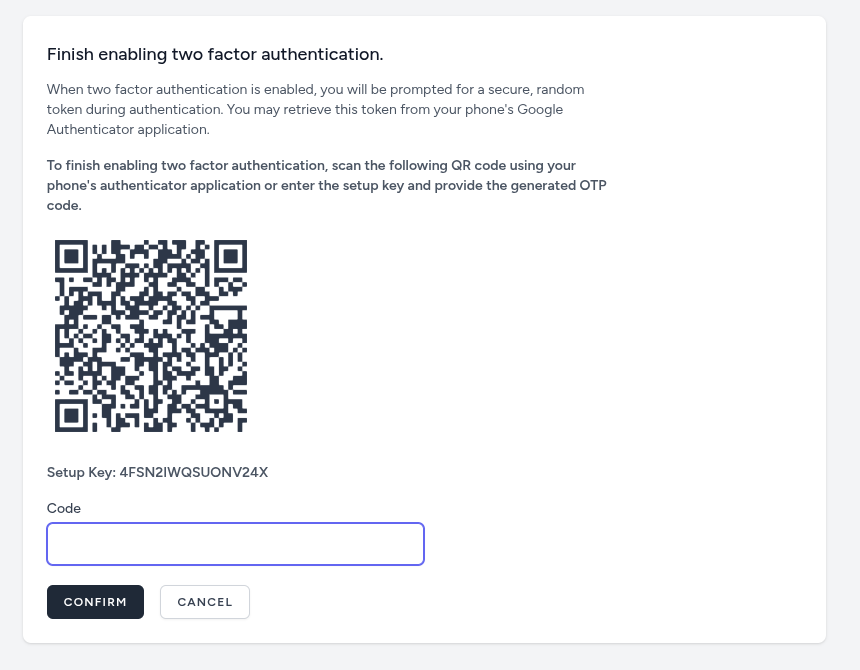
- Scan QR Code: Use an authenticator app (like Google Authenticator) on your phone to scan the displayed QR code.
- Verify: Enter the code shown on your phone into the dashboard to confirm setup.
- Recovery Codes: Save the displayed recovery codes in a secure place. You will need these if you lose access to your phone.
Disabling 2FA
If you need to disable it (not recommended):
- Go to the 2FA section in your profile.
- Click Disable.
- Enter your password to confirm.