Settings
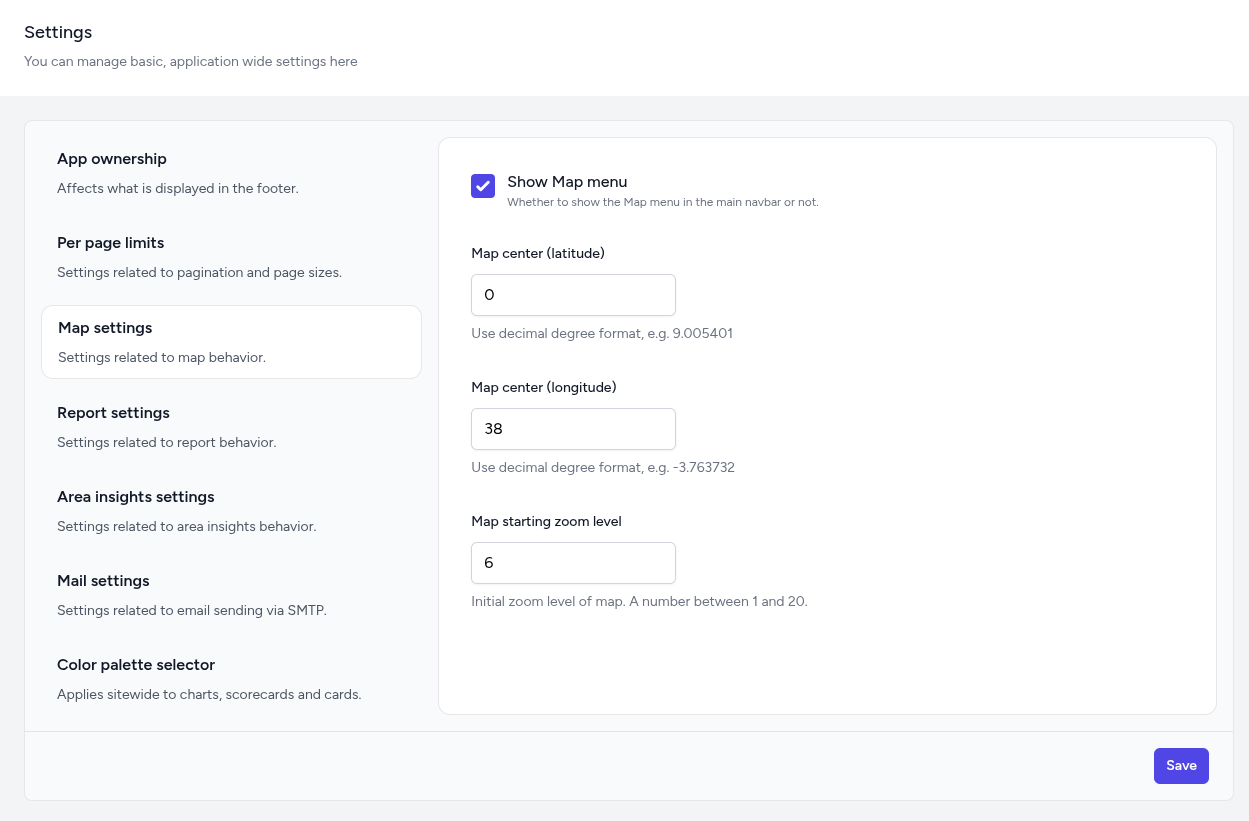
The Settings module acts as the central nervous system of the platform, allowing administrators to define the global behavior, appearance, and technical configurations of the dashboard. Instead of a single long form, settings are organized into Groups (tabs) to separate/group related settings.
The Settings interface is designed for high-level control. Changes made here typically apply across all pages, indicators, and user sessions.
-
App ownership: Controls the core branding of the platform, specifically the organization name and website URL that are displayed in the application footer.
-
Per page limits: Manages pagination and data display settings, allowing you to define how many records or items are shown per page across different dashboard modules.
-
Map settings: Configures the primary geospatial behavior, including the default latitude/longitude center point, initial zoom levels, and whether the Map menu is visible in the main navbar.
-
Report settings: Houses the specific configuration which decides whether the Report menu is visible in the main navbar.
-
Area insights settings: Houses the specific configuration which decides whether the Area Insights menu is visible in the main navbar.
-
Mail settings: Configures the SMTP server details, including the host, port, authentication credentials, and encryption methods required for system-generated emails.
-
Color palette selector: Allows for the sitewide selection of Categorical, Sequential, or Diverging color schemes to be applied to all charts, scorecards, and data cards.