Data Sources
Data Sources (or sometimes referred to as questionnaires) are the origin of your data. It us usually the representation of a census or survey exercise within the Dashboard.
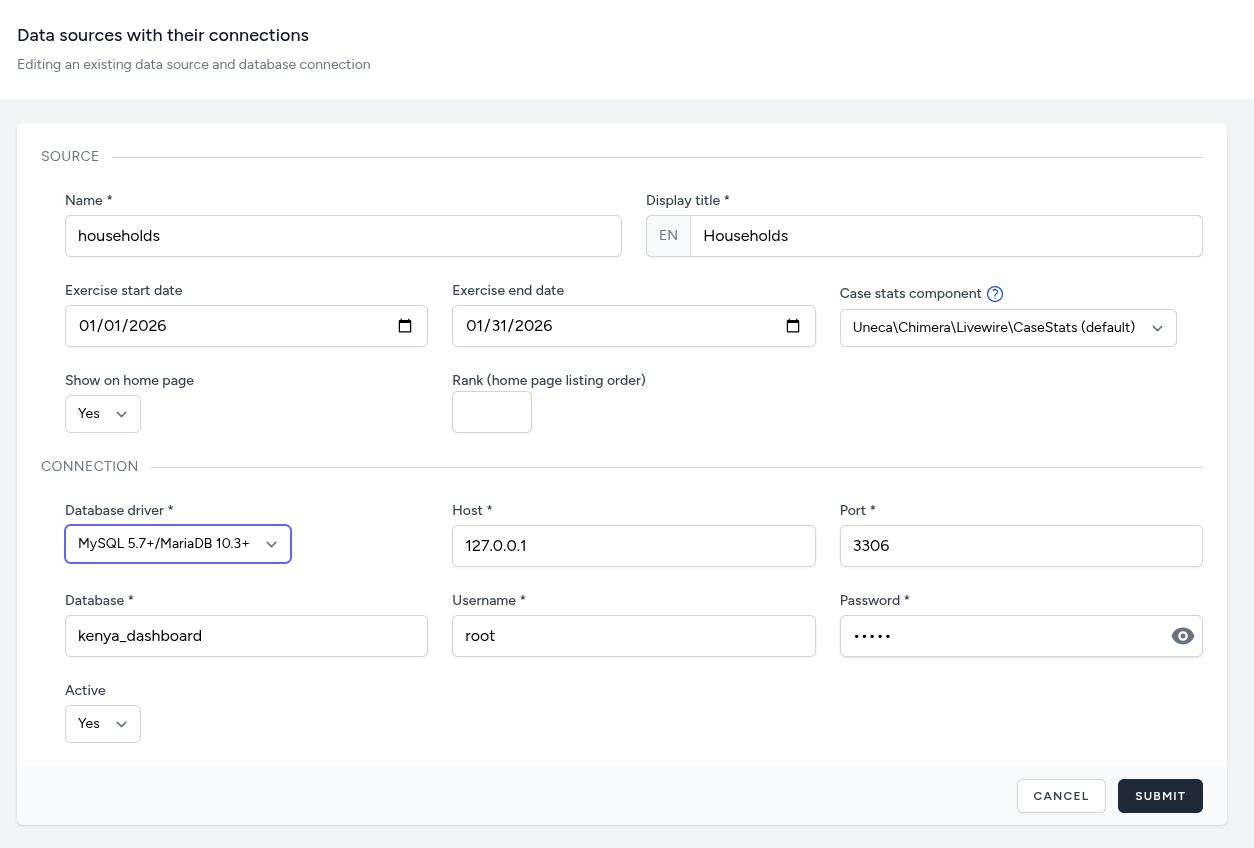
Data Source Configuration Interface
The "Create New" data source interface allows administrators to define the identity of a data source and the technical credentials required to access it.
Source Information Section
This section defines how the data source appears and behaves within the dashboard.
- Name & Display Title: The internal system name (e.g., households) and the localized public-facing title (e.g., Households).
- Exercise Timeline: Specific Start and End dates (formatted as MM/DD/YYYY) to define the temporal boundary of the data collection exercise.
- Case Stats Component: A dropdown menu to select the specific Livewire component responsible for rendering statistics for this source. The built-in default component will present interview stats in four groups (Total, Completed, Partial and Duplicate). If you have a custom Livewire component that presents the case stats in a different way, you can select it here and it will be used for this data source.
- Visibility & Ranking: Controls whether the source is active on the home page and its specific numerical position in the listing order.
Connection Parameters Section
This section manages the link between the dashboard and the external database.
- Database Driver: A selection for the database type, such as MySQL, PostgreSQL, SQLite or SQL Server.
- Server Credentials: Standard fields for the Host IP (e.g., 127.0.0.1), the Port (e.g., 3306), and the specific Database name.
- Authentication: Input fields for the Username and a masked Password field with a toggle to reveal characters for verification.
- Status Toggle: A final "Active" dropdown to enable or disable the connection without deleting the configuration.
Data Source Management Interface
On the main data sources page, you can manage existing data sources. Meaning that you can edit, test or delete a source.
The Test feature allows you to verify that the connection to the database is working correctly.